


Breakout Room Assignment Enhancements @Zoom_US – Half of a Great Idea
This post has been viewed 2,777 times.
Breakout Rooms distinguish @Zoom_US from other video conferencing products and have driven its appeal in several verticals – including mediation.
The latest software release (5.3.0) adds a third option for sorting Breakout Rooms – “Let participants choose room”. Prior versions allowed hosts to assign automatically or manually.
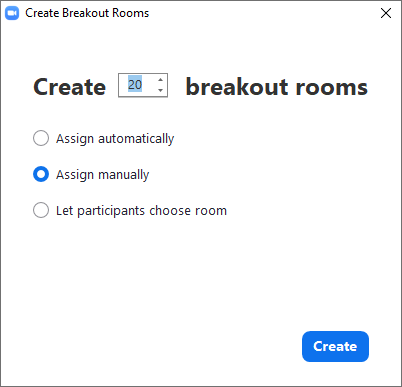
Like automatic assignment, participant selection would be great in academic or other large group broadcasts. Rather than laboriously assign mass participants to Breakout Rooms to discuss in small groups what they’ve learned, send them quickly with automatic assignments. Letting them choose how to group is a feature enhancement for that setting. Kudos to @Zoom_us for spending some time on Breakout Rooms now that they’ve addressed security and provisioning issues than attended explosive pandemic growth.
But this modification could introduce a milder version of the #Zoombombing that occurred early on – people dropping in uninvited. By the time a participant gets to any Breakout Room, they’ve been authenticated according to the host’s preferences. So strangers to the overall group will not parachute into a Breakout Room like they may have into earlier classrooms if the host had not adjusted the settings. For an early article reviewing settings mediators could deploy to protect mediation sessions, see www.adrtoolbox.com/2020/03/tailoring-zoom-to-mediation-for-the-moment/
Again, mediators should tailor their settings for these new features – and hopefully Zoom will further enhance this feature to mitigate downside risks.
In some cases, it will be fine to allow participants to roam the halls like a physical mediation. They can always run into others spontaneously or knock on their door to chat while the mediator is otherwise occupied.
But it doesn’t take much of an imagination to see how it could be misused – at least until there is a meaningful “doorbell” feature that requires participants to ring the bell while allowing other participants to not answer the door. Waring spouses are in the mediation legitimately – they are not unauthenticated #Zoombombers. But that does not mean they should be able to send each other chats, share screens, or barge into the other’s Breakout Room unannounced.
In more of my cases, it would be quite helpful for participants in groups to be able to chat without moderation. For instance, in a construction case involving several sub-contractors that each have insurance – and perhaps coverage issues – it would be helpful for their defense lawyers to be able to chat with their own and the insurance company’s coverage counsel. And those three pods within that party group might want to caucus separately or in different combinations. How nice it would be if they could do so. The same logic would often apply to all or several of the subcontractor groups – they might want to meet with the general contractor group. A Joint Session for everyone could be a further option, but it might be more restricted depending on the case.
Zoom could make these tailored options available to Hosts (mediators and others) using code it has already deployed, while further enhancing and differentiating its best feature. By redeploying code Zoom already has, it could allow Hosts to:
- Group Breakout Rooms and/or Participants
- Designate which Participants can roam – much like co-hosts with restrictions
By tiering Breakout Rooms into parent-child pods, Zoom could facilitate the construction example above. Within each tier below, the contractor and their assigned defense counsel could be in a Breakout Room. Their own personal counsel on coverage could have another room when needed – as could the coverage counterpart for the insurance company. They could freely roam within that grouping – or in some instances roam to the All Defense caucus. Depending on the host’s (mediator’s) permission settings, they could roam to other rooms while still not others. That would allow internal security in the contentious divorce too.
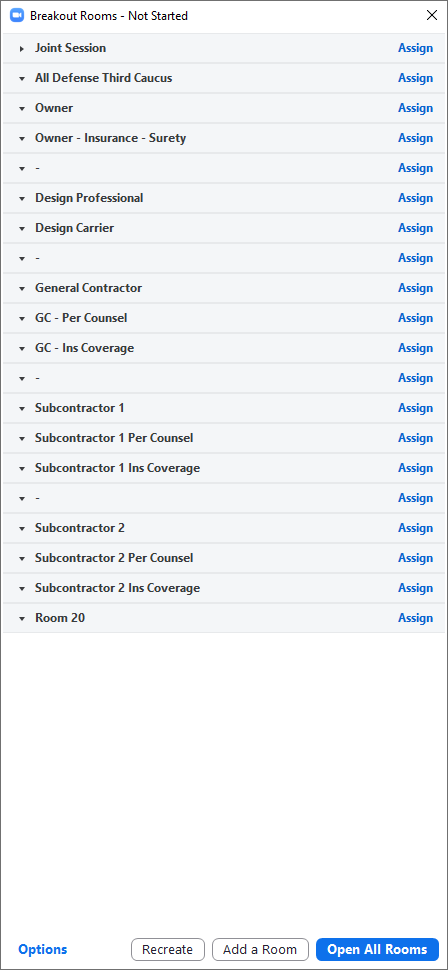
In another efficient fix redeploying existing code, Zoom could allow hosts to designate which Participants can “choose room”. It may be fine to allow the divorcing couple’s lawyers roaming permission, but not the estranged parties.
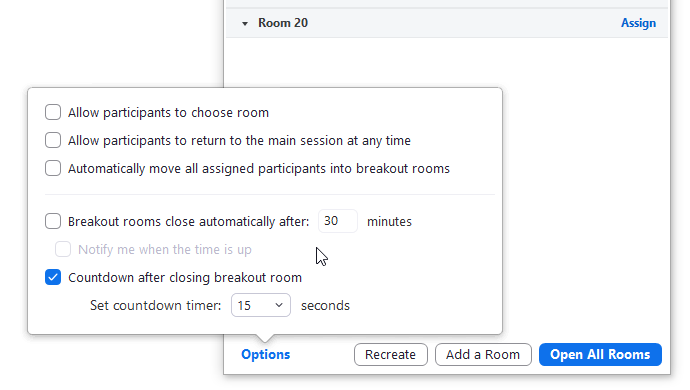
Another small tweak – allow host to save Breakout Room renames. It would be nice to rename Breakout Rooms and preassign Participants days before a mediation. Currently, when a host exits a meeting – to join another or close Zoom – those Breakout Room renames and assignments are lost and have to be redone when reopening that meeting.
Zoom has been instrumental to commerce in quarantine. Its ingenious Breakout Rooms have been key to mediations and so many other applications. The latest code update shows it is spending money enhancing that distinguishing feature. Here’s hoping it’ll continue to lead the way with some efficient tweaks. Several platforms facilitate one-to-many instruction modes that these mass Breakout Room assignments further facilitate. The real genius of Breakout Rooms to facilitate high-level negotiations more efficiently is a few development hours ahead.
Read original articleTags: